Skip to content
OffcutBenchBY SMARTFACT

FREE OFFCUT TRACKING FOR ONE RACK

How long does an offcut need to be for the job?

Updated

An offcut is long enough when its guaranteed length, the measured length less any measuring uncertainty, covers every blank plus a blade width for each blank, end trim and any safety margin. OffcutBench works this out free in your browser and lists the pieces on your rack that fit, shortest first, so you can use one before cutting new stock.

Free to use. No account, email address or trial. Works offline once prepared.

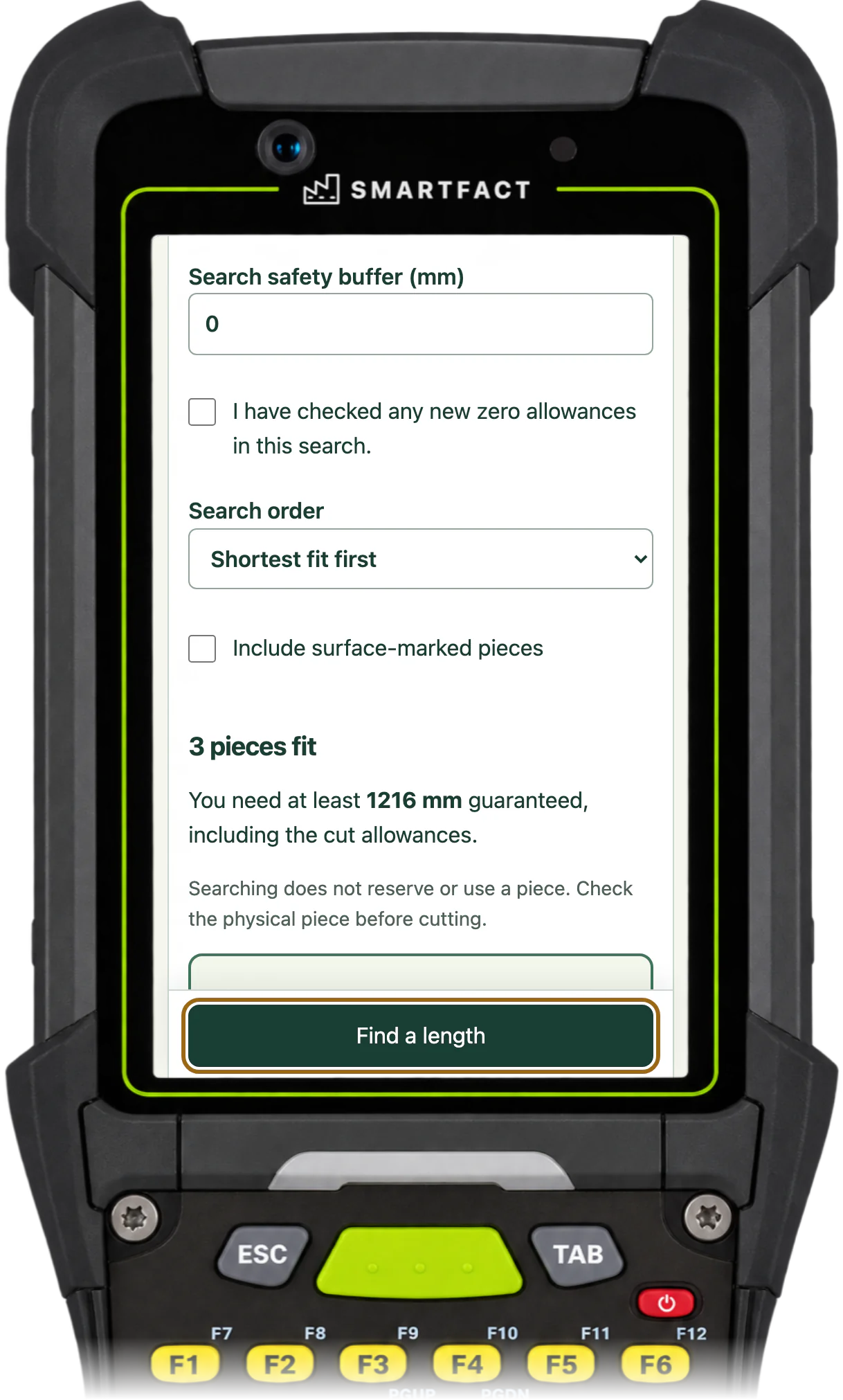
OffcutBench search result: 3 pieces fit, you need at least 1216 mm guaranteed, first choice 1248 mm guaranteed in bin A1 with 32 mm spare
The pieces long enough for two 600 mm blanks, on a phone, handheld or scan station.

How do you work out the length you need?

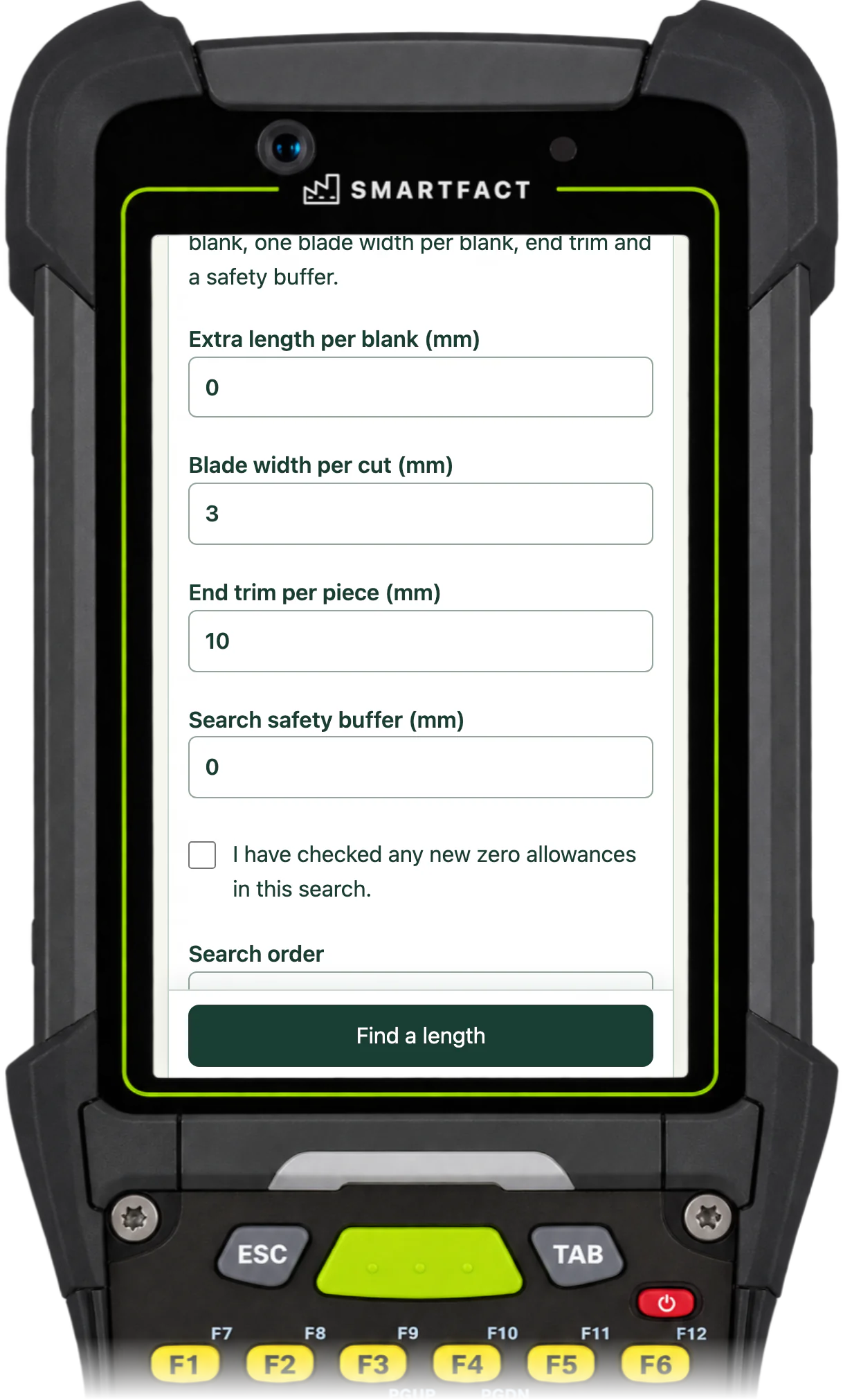
Add any extra length per blank to the finished length and multiply by the number of blanks. Add one blade width for each blank, then the end trim and a safety buffer. For two 600 mm blanks with a 3 mm blade, 10 mm of trim and no extra length or buffer, that is 2 × 600 + 2 × 3 + 10 = 1216 mm.

OffcutBench cut allowances: extra length per blank, blade width per cut, end trim per piece and search safety buffer
The allowances added to the search, which you can change for each job.

Why take off the measuring uncertainty?

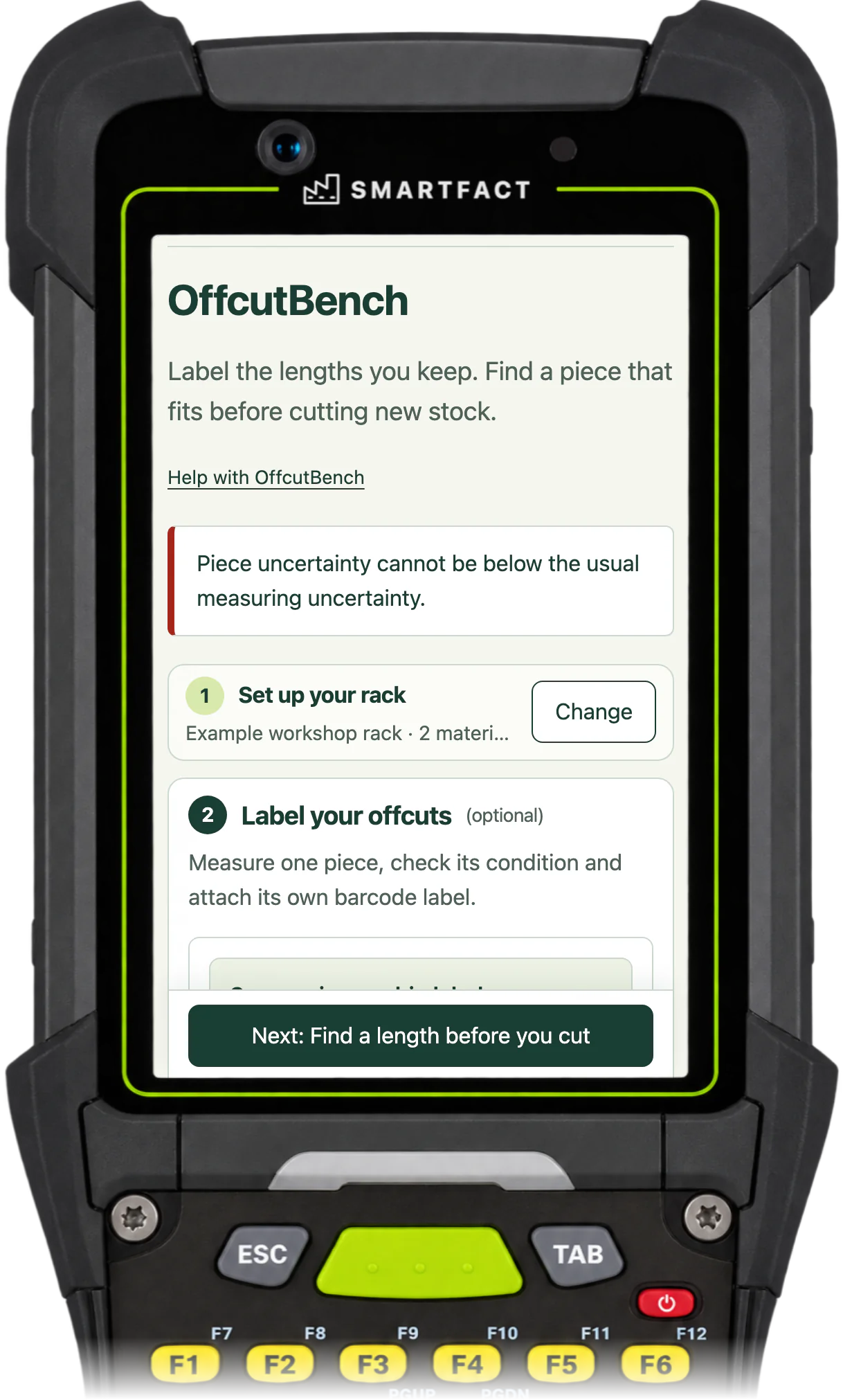
A piece that measures 1250 mm on the tape could be 1248 mm. OffcutBench takes each piece's measuring uncertainty, at least the rack's usual figure, off its measured length, and offers a piece only if this guaranteed length covers the length the job needs. Enter a larger uncertainty for a piece that is hard to measure.

OffcutBench refusing a 1 mm uncertainty: Piece uncertainty cannot be below the usual measuring uncertainty.
An uncertainty below the rack's usual figure is refused.

Which offcut should you use first?

By default, the shortest piece that fits, which keeps longer pieces for longer jobs; you can choose oldest first instead. Each result shows the guaranteed length, the spare length, the bin, the condition, when it was recorded and why it ranks where it does. A search reserves nothing and changes nothing, so check the piece before you cut.

What if no offcut is long enough?

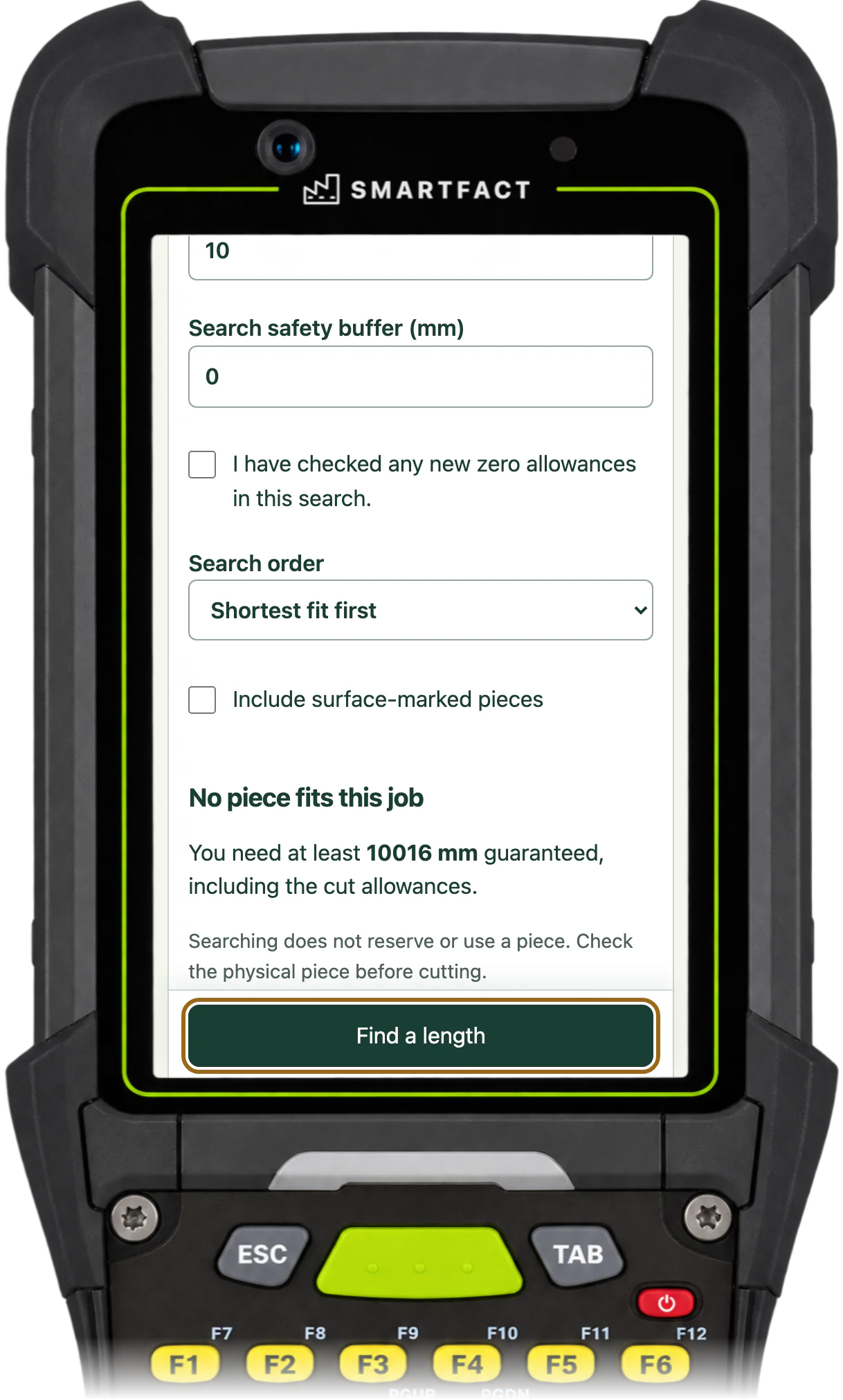
OffcutBench says No piece fits this job and shows the length you needed. That describes your list, not the rack itself, so check the rack before you cut new stock.

OffcutBench saying No piece fits this job: you need at least 10016 mm guaranteed, including the cut allowances
No listed piece is long enough for two 5000 mm blanks.

What do you record after the cut?

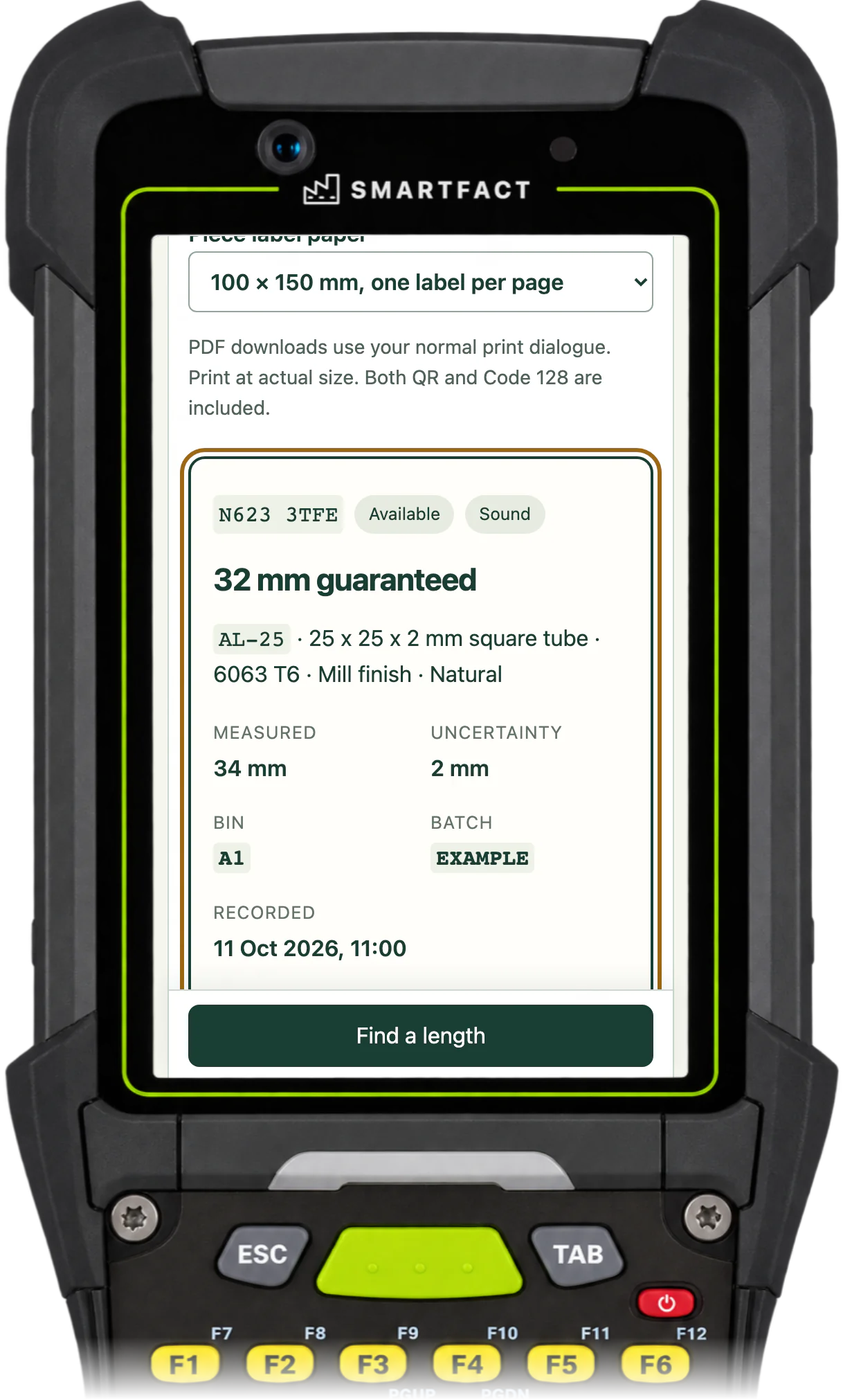
Record the cut on the piece you used: the blanks, blade width and trim, and the remainder, remeasured rather than calculated. A kept remainder gets its own label. If its guaranteed length is below your keep threshold, OffcutBench suggests scrapping it, and you can still keep it.

OffcutBench showing the kept remainder after a cut as a new available piece: 32 mm guaranteed, measured 34 mm, in bin A1
The remeasured remainder, recorded as a new piece.

What OffcutBench does not do

It looks for one piece for one job. It does not plan cuts across several pieces, nest parts or optimise a cutting list, and it does not control a saw. The default allowances are starting values, not a recommendation for your machinery, so set them for your own blade and trim.

MADE FOR THE FLOOR

For saw operators, fabricators and joiners preparing blanks who want to know whether an offcut on the rack is long enough before cutting new stock.

A USEFUL STARTING POINT

Long enough on the tape is not always long enough to cut

A piece that measures exactly the total of the blanks is too short once the blade and the end trim are allowed for, and a quick tape measurement can be a few millimetres out. OffcutBench adds the allowances to the job and takes the uncertainty off each piece, so a piece is offered only when it is long enough.

FROM QUESTION TO EVIDENCE

Three steps to a useful result.

  1. 01

    Choose the material

    Pick the material from your rack, so only pieces of exactly that material are considered.

  2. 02

    Enter the blanks

    Enter how many blanks and their finished length, then review the extra length, blade width, end trim and safety buffer for this job.

  3. 03

    Pick a piece and record the cut

    Check the first choice on the rack, cut it and record the cut, with the remainder remeasured and labelled.

A CONCRETE EXAMPLE

1250 mm on the tape, 1248 mm to cut from

Two 600 mm blanks of AL-25 tube need 1216 mm with a 3 mm blade and 10 mm of trim. The rack has a 1250 mm piece measured to within 2 mm, so 1248 mm guaranteed: it fits with 32 mm spare and is offered first. A 1302 mm piece with surface marks is left out unless you include surface-marked pieces, and a damaged 1800 mm piece is never offered.

USED IN PRODUCTION

From one rack to the whole workshop.

OffcutBench keeps one person's list for one rack. When several people cut from shared racks, RemnantRack keeps the offcut register for the whole team. It is in early access, with scope agreed at onboarding.

Early access

RemnantRack

RemnantRack gives every reusable offcut a label, an exact length and a confirmed bin across your racks. Search for the length a job needs, reserve the piece so nobody else takes it, record the cut and label the remainder, with team access and a history for every piece.

BEFORE YOU START

A few practical answers.

What is kerf?

The width of material the blade removes in a cut. OffcutBench calls it blade width and adds one for each blank. Measure it for your own blade; the default is 3 mm, or 1/8 in on an inch rack.

Does it work in inches?

Yes. Choose inches when you create the rack, and enter decimals or fractions such as 48 1/64. The unit is fixed for that rack, and lengths are never converted or rounded.

Does it decide which piece we cut?

No. It lists the pieces that fit, in the order you choose, and reserves nothing. You choose the piece, check it and record what you did.

What are the current limits?

OffcutBench is one person's list for one rack of straight lengths, such as bar, tube, extrusion, profile or timber. There are no sheets or irregular shapes, no nesting or cutting optimisation, no reservations, no shared team stock and no saw control, and a search never reserves or changes a piece. Each search looks for one piece long enough for the whole job. A project holds one rack with up to 100 bins, 500 materials, 2,000 available pieces and 20,000 history records, in a saved file of at most 5 MiB. Lengths run from 1 mm to 60 m. The unit is fixed when the rack is created, and the usual measuring uncertainty is fixed once the first piece is recorded. CSV imports are up to 5 MiB, and one invalid row stops the whole import. The camera reads QR, Code 128, Data Matrix, EAN and UPC barcodes. Labels and reports show what you recorded, not proof that a piece is on the rack.

What happens to my data?

Your rack stays in this browser. Work starts in memory and is lost on refresh until you choose Save on this device or download a backup. Nothing you record, scan or download is uploaded, and camera images are decoded on your device and never stored. No account or contact details are needed. Google Analytics is optional and loads only after you accept; it never receives materials, lengths, label codes, job references or file contents. Use Analytics settings on these pages or in the tool to change your choice; see /privacy/.

ONE SMALL JOB, DONE WELL

Put OffcutBench to work.

Open the free tool and start with one known example.

Track offcuts free →

THE SMARTFACT SUITE

Practical tools. Useful on their own.
Better around the same floor.

Automate factory decisions with rules you describe in plain English. Explore focused SmartFACT services, plus free tools for everyday checks.

Early accessSuggested next step

RemnantRack

Label each offcut, find a suitable length before cutting new stock and record what you used. Approved plain English rules decide what to keep and where it goes.

Explore RemnantRack ↗
Invited trial

LabelRules

Describe label rules in plain English. Automatically select layouts, resolve customer codes and check each job before printing.

Explore LabelRules ↗
Early access

KitProof

Turn plain English component rules into automatic kit checklists, then check scans against the expected parts and quantities.

Explore KitProof ↗
Early access

WorkSteps

Turn plain English rules into automatic step selection for each unit, with required evidence and a record of completed work.

Explore WorkSteps ↗
Early access

FactorySpec

Apply approved product rules and calculations automatically to turn dimensions and options into manufacturing requirements.

Register early-access interest ↗
Early access

ConfigSheets

Bring data in from uploaded sheets or the Shopify, WooCommerce and PrestaShop connectors, check each change and deliver it to the products that use it.

Explore ConfigSheets ↗
Early access

ParcelOffice

Scan the work order and the parcel choice to book the courier and print the labels. Approved plain English rules recommend or choose the parcel.

Explore ParcelOffice ↗
Early access

RefillFlow

Scan an empty container to send the right refill request to stores. Approved plain English rules set the stores queue, priority, ticket printer and escalation.

Explore RefillFlow ↗
Invited trial

ToolCustody

Check a shared tool before handover, record who has it and keep damaged or overdue tools out of the next issue. Explore an invited trial for one factory crib.

Explore ToolCustody ↗
Invited trial

StoresFlow

Receive, put away, reserve and issue stores material with barcode checks, keeping held, reserved and available stock apart. Explore an invited trial for one stockroom.

Explore StoresFlow ↗
Invited trial

LotTrail

Follow a lot or serial number through the records your factory already keeps, with the source of each link and the gaps shown. Explore an invited trial with two declared sources.

Explore LotTrail ↗
Early access

CheckStation

Scan an identified unit to get its approved final-inspection checks, then record exact readings with their result, holds and release history.

Register early-access interest ↗
Free tool

ScannerBench

See the text and key events your keyboard scanner sends. Compare them with the value you expected.

Test a scanner ↗
Free tool

PrintBench

Print a known PDF, measure its reference marks and compare scans from the printed codes.

Check a print ↗
Free tool

CardBench

Create 100 × 50 mm bin and rack cards with Code 128 or QR, from one record or a CSV.

Make bin cards ↗
Free tool

CountBench

Count stock by location with a barcode scanner, compare it with a stock file and export the results. No account needed.

Start a free count ↗
Free tool

BarcodeBench

See exactly what a scanned barcode contains, with hidden characters shown and GS1 fields, check digits and dates explained. No account needed.

Inspect a barcode ↗
Free tool

MatchBench

Scan a reference and each label, see an exact match or the first difference, and download the results. No account needed.

Start a free comparison ↗
Free tool

TagBench

Scan an item or location, note what needs attention, print a review tag and keep a review list. No account needed.

Make a free tag ↗
Free tool

FindBench

Load your own parts and locations CSV, scan a code and see every location it lists. No account needed.

Start a free lookup ↗
Free tool

ManifestBench

Check cartons, pallets or serial numbers against a list with a phone or scanner and see what is missing. No account needed.

Start a free check ↗
Free tool

FeedBench

Check CSV and JSON files exactly as written, preview a column mapping and compare two versions by key. No account needed.

Check a file free ↗
Free tool

CycleBench

Time work cycles and changeovers on a phone, record interruptions with reasons and download the results. No account needed.

Start a free study ↗
Free tool

OffcutBench

Label the offcuts on your rack, find a piece long enough before cutting new stock and record what you used. No account needed.

You are here
Free tool

TraceBench

Load one or two CSV exports and follow a lot or serial forwards or backwards, with the row behind every link. No account needed.

Start a free trace ↗
Help

SmartFACT Help

Step-by-step guides and interactive demonstrations for the SmartFACT suite. Read the instructions, watch a task or practise with real product screens and sample data.

Open SmartFACT Help ↗